

Salesforce Marketing Cloud
Lead Scoring in Salesforce Marketing Cloud: The 2026 Guide
Marketing Cloud was built to send. It was not built to tell a sales rep which lead to call first.
Ask any B2B team running Marketing Cloud where their lead score lives and you get a pause.
If this is the problem you are working through, B2B Personalization Strategy covers the next level of detail.
Usually it is a custom field somewhere, fed by opens and clicks, that nobody fully trusts.
That gap is real, and it has a handful of legitimate fixes. Below are five of them, what each one actually scores, and how much work each takes.
The short version. Marketing Cloud has no lead scoring out of the box, so you are choosing between adding a layer that does it and building something that approximates it.
A dedicated behavioral layer like SalesWings captures what leads do on your website, scores it alongside firmographic fit, and writes both back into Marketing Cloud and Sales Cloud. That is the short path.
The alternatives are native workarounds. They score your sends, not your buyers, and none of them sees the pricing page visit that actually tells you someone is ready.
What changed since this guide first ran
The original version was published in 2021. Four things in it are now out of date.
- Process Builder is off the table. Salesforce ended support on 31 December 2025, and you have not been able to create new ones since Spring ’25. Anything you build now goes in Flow.
- Pardot is now Marketing Cloud Account Engagement. Same product, different name, still a separate SKU from Engagement.
- Marketing Cloud Next arrived. The Growth and Advanced editions sit on Data Cloud, orchestrate with Flow rather than Journey Builder, and ship with People Scoring and Account Scoring.
- The Google Analytics 360 route no longer earns a section. The current integration runs on GA4 and is a journey reporting tool, not a scoring mechanism.
What has not changed is the underlying problem, which is why this guide still exists.
What Marketing Cloud sees, and what it misses
Marketing Cloud Engagement knows a lot about your messaging. Sends, opens, clicks, unsubscribes, push interactions, SMS replies.
What it does not natively see is the part of the buying process that happens off the back of those sends.
A subscriber who opens nothing for three weeks, then reads your pricing page four times in a day, looks dormant in Marketing Cloud. To sales, that is the best lead in the list.
That is the gap. Every option below is a different way of closing it.
The five options, compared
Marketing Cloud has no out-of-the-box lead scoring, so every option below is either a workaround, a narrower feature than it appears, or an add-on.
Read the middle column first. Most scoring projects go wrong because the chosen tool scores the wrong thing.
| Option | What it scores | Type | Time to first usable score |
|---|---|---|---|
| FeaturedSalesWings | Website, app, form, campaign and email behavior, plus firmographic fit | Marketing Cloud add-on | Days |
| Build it yourself1. Flow plus Marketing Cloud Connect | Email opens and clicks synced into Sales Cloud as points | Sales Cloud plus Connect | Weeks of admin build |
| Build it yourself2. Journey Builder score field | Email activity and CloudPages form submissions | Marketing Cloud Engagement | Days, but only per journey |
| Native3. Einstein Engagement Scoring | Predicted likelihood to open, click and stay subscribed | Marketing Cloud Engagement | Up to 90 days, and only with the volume |
| Separate licence4. Marketing Cloud Personalization | Web and app affinities, for recommendation rather than qualification | Separate Salesforce product | Months |
| Platform move5. People and Account Scoring | Whatever behavior and profile data you modelled in Data Cloud | Marketing Cloud Next | Months |
Product references: Einstein Engagement Scoring, Google Analytics integration for Marketing Cloud Engagement.
Salesforce Marketing Cloud + SalesWings Webinar
FeaturedMarketing Cloud add-on
SalesWings: the behavioral layer Marketing Cloud does not have
SalesWings is not a marketing automation platform and does not replace Marketing Cloud. It sits alongside it, and it is the only option here that scores what happens on your website.
It collects first-party behavior from your website, portal, app, landing pages and campaigns, then ties that behavior back to the subscriber, lead, contact and account.
From there it does four things Marketing Cloud cannot do on its own.
- Tracks what happens between sends. Page visits, repeat visits, video, documents, logins and form activity, in real time.
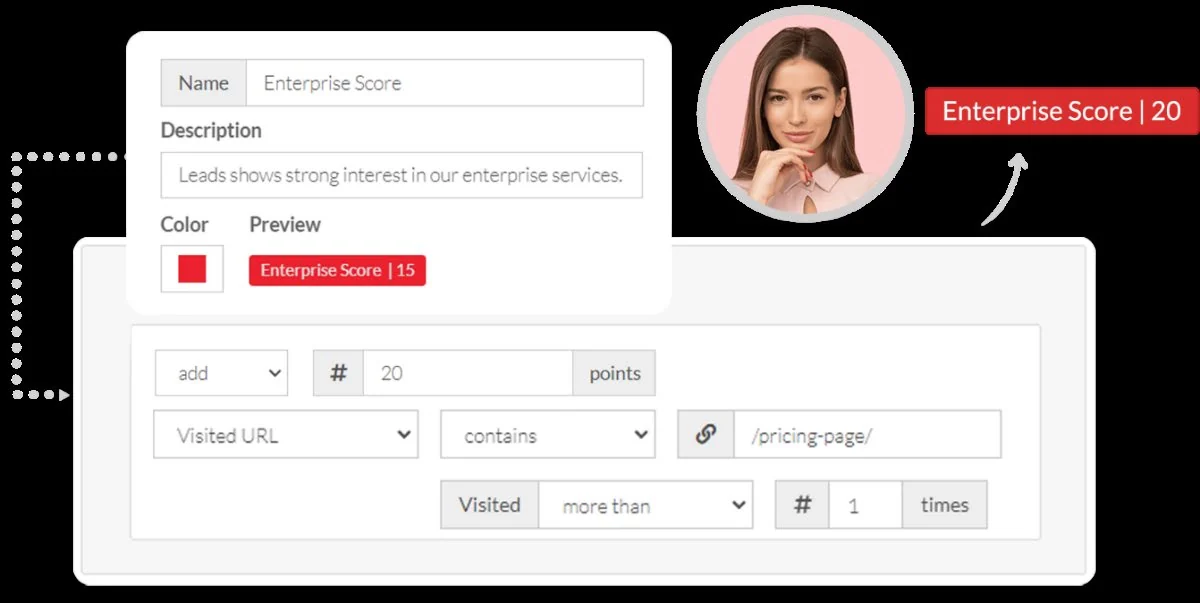
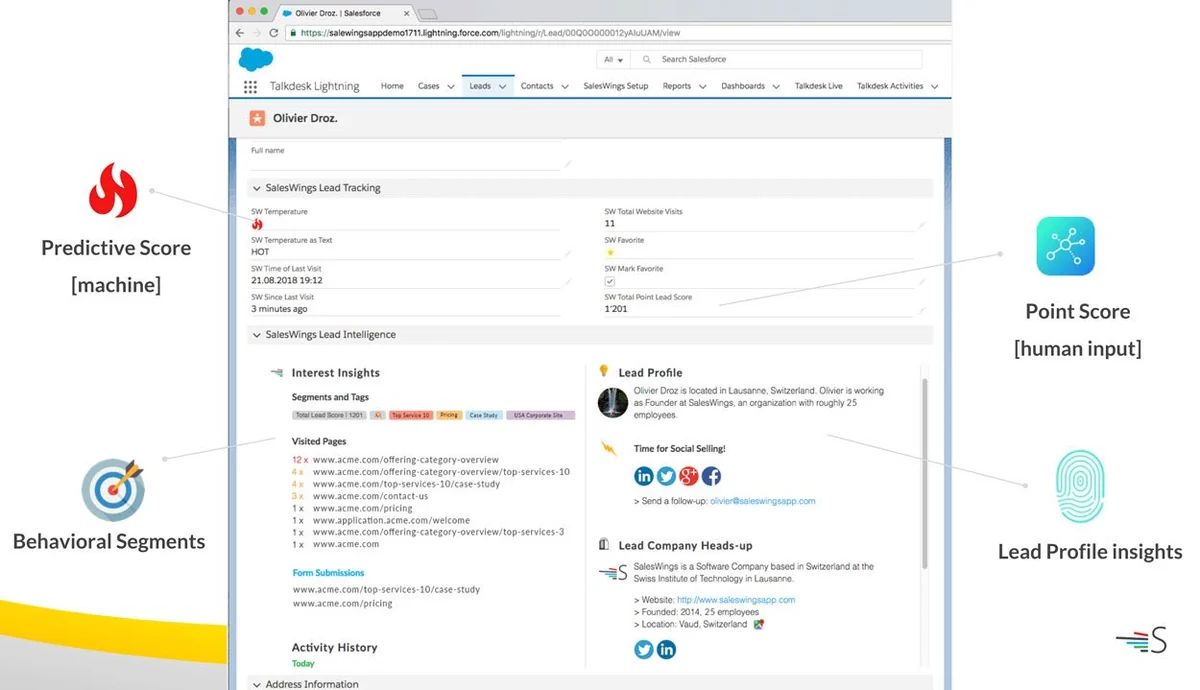
- Scores behavior and fit separately. A predictive score for urgency, point-based categories for interest, and firmographic grading for fit.
- Names the interest, not just the number. Tags and segments tell you which product or topic a lead keeps coming back to.
- Puts it in front of the rep. Scores, journey history and interests land natively on the lead, contact and account record in Sales Cloud.
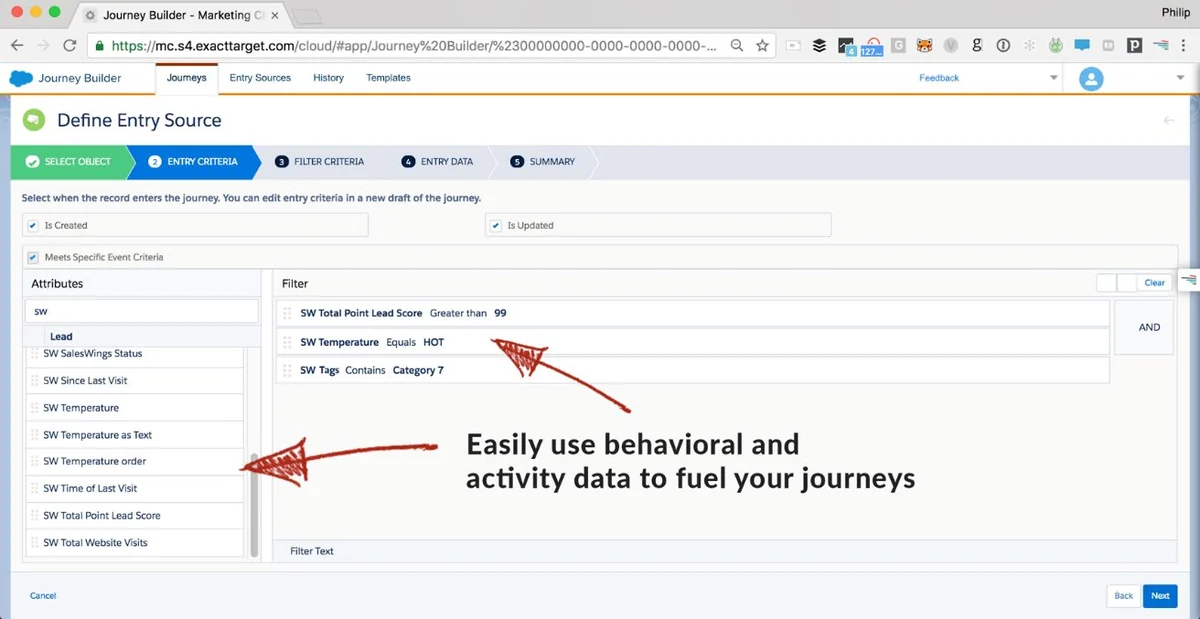
Those same fields and segments are written into Marketing Cloud data extensions, so you can use them as journey entry criteria, decision splits and audience filters the same day.
What it adds that the native options do not
Website behavior. Einstein scores your sends. Journey Builder scores your journeys. Neither sees the pricing page visit.
A fit dimension. Grading on title, size, industry and region sits next to the activity score instead of being folded into it.
A reason, not just a number. The rep sees which topics the lead keeps returning to, so the score survives contact with sales.
Days, not quarters. No Data Cloud modelling and no separate licence to implement first.
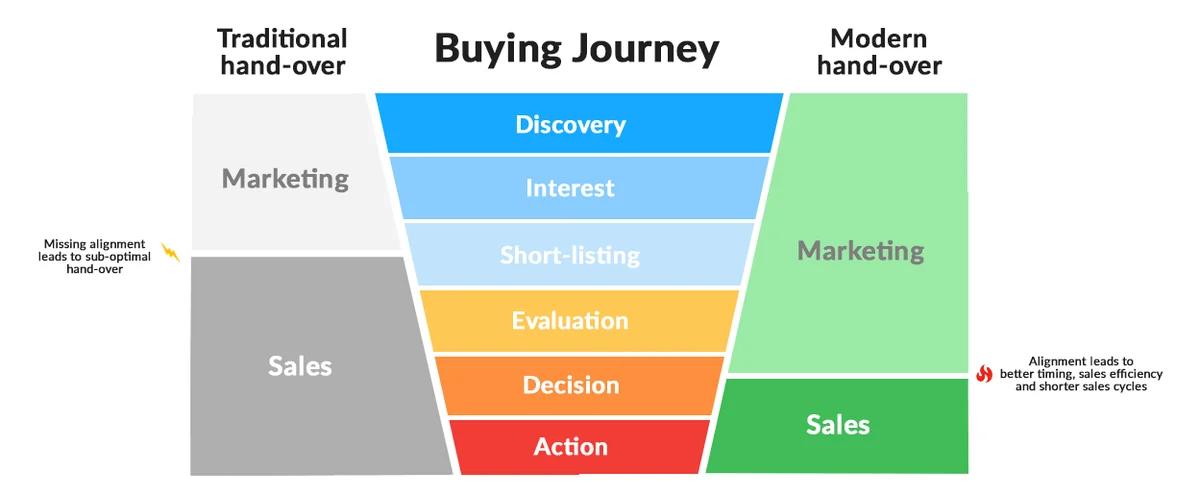
The practical effect is that marketing gets segmentation it could not build before, and sales gets a reason to trust the handover. That is the whole point of sales and marketing alignment.
“SalesWings unlocks fantastic lead and account insights inside the Salesforce platform. I am impressed how SalesWings enables marketing teams to effortlessly leverage in-the-moment intent data to enable real-time personalization.”
You can also explore SalesWings Toolbox for Salesforce for the practical Salesforce context.
Eliot Harper, 7x Salesforce MVP
Option 1Build it yourself
Option 1: Flow and Marketing Cloud Connect
Marketing Cloud Engagement has no native point scoring, but Sales Cloud has the parts to build one.
If this is the problem you are working through, Salesforce Native Integrations covers the next level of detail.
With Marketing Cloud Connect, email sends, opens and clicks sync back to Sales Cloud as Individual Email Result records. A record-triggered Flow reads those and increments a custom score field on the lead or contact.
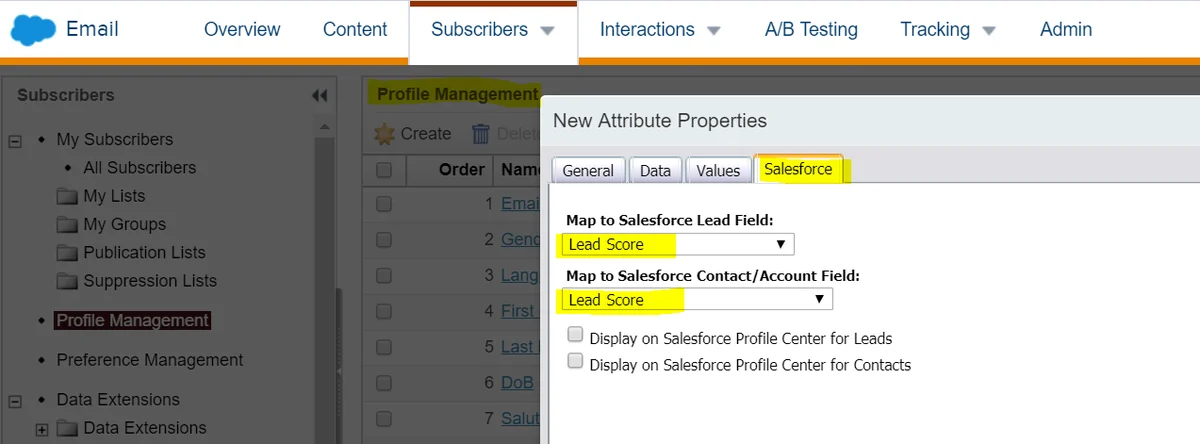
The score then travels the other way. Define it as a profile attribute in Marketing Cloud, sourced from your linked Sales Cloud org, and it becomes available for segmentation and journeys.
What to watch
- Build it in Flow. Process Builder is unsupported and closed to new automations.
- Email result volume gets heavy fast on large sends. Filter early rather than firing a Flow on every open.
- The sync is not instant, so treat the score as near real time, not real time.
- Someone has to own the point values. Without that, the model drifts within two quarters.
Good fit when: you have Sales Cloud admin capacity, your buying signals really are email-led, and you want full control of the logic.
Option 2Build it yourself
Option 2: Journey Builder writes the score
The lighter version of option two, and it stays inside Marketing Cloud.
Build a journey with an engagement split on opens and clicks, then use an Update Contact activity to write a value into a Lead Score attribute.
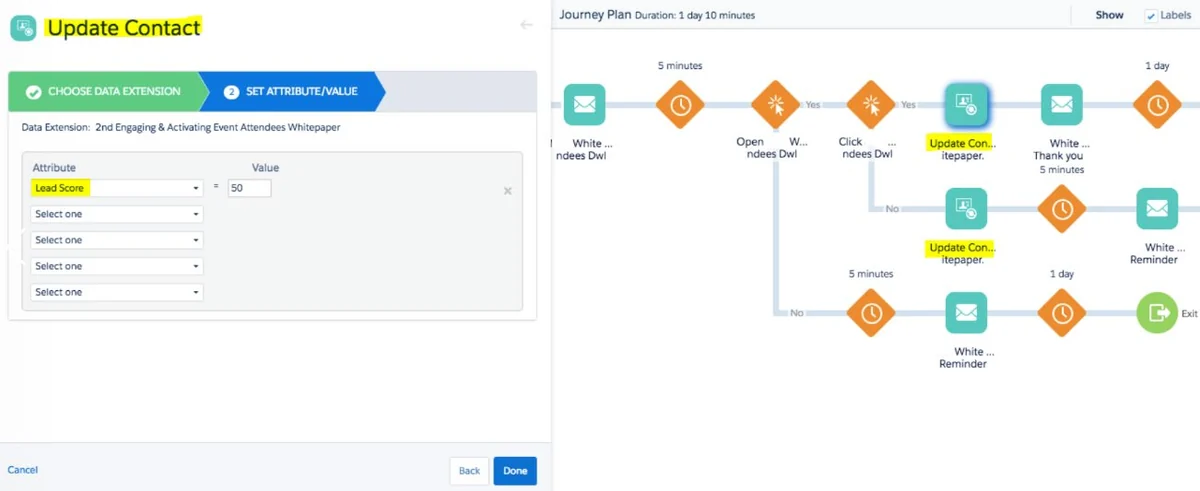
If you send traffic to CloudPages instead of standard web pages, form submissions can feed the same journey through a Data Extension entry source.
That gets whitepaper downloads, demo requests and event registrations into the score.
Where it stops
Scores set this way are per journey, not per person across all activity. Running five journeys means five places the score can be written, and they will disagree.
It also only sees CloudPages. Everything a lead reads on your main site stays invisible.
Good fit when: you need a working score this month for one campaign, and you can live with rebuilding it properly later.
Option 3Native
Option 3: Einstein Engagement Scoring
Often raised as the native answer to lead scoring. It is worth being precise about what it actually does, because the name promises more than the feature delivers.
Einstein predicts how a subscriber will behave with your messaging: likelihood to open, to click, to stay subscribed. It is an email deliverability and list-hygiene tool. It does not predict whether anyone will buy.
The prerequisites are the hard part
Switching it on in Setup takes minutes. Getting a usable score out of it does not.
- You need at least 1,000 engagement events in the 90 days before activation. Business units below that threshold get nothing.
- The model can take up to 90 days to build. You only see scores in 24 to 48 hours if you already had that history sitting there.
- Web conversion predictions are a separate enablement through your account rep, then another 90 days of collection.
- Scores refresh weekly, so a lead who went hot on Tuesday is still scored as of last week.
- The model cannot be customised. You cannot weight an action, add a signal, or ask it why.
What it does not cover
No website behavior. Einstein sees your sends and, if you configure it, a narrow set of conversions. The pricing page visit that actually signals intent is invisible to it.
No fit dimension either. There is no grading on title, company size or industry, so a highly engaged subscriber who will never buy scores the same as a decision maker.
And no explanation. Sales teams tend not to act on a number they cannot decompose, which is where adoption usually dies. We go through that trade-off properly in SalesWings compared with Salesforce Einstein.
Good fit when: you send at high volume, already hold 90 days of engagement history, and the question you need answered is who to stop emailing rather than who to call.
Option 4Separate licence
Option 4: Marketing Cloud Personalization
Formerly Interaction Studio, and before that the Personalization Builder story in the original guide.
It captures known and anonymous web and app behavior through a tracking script, builds affinity profiles, and drives real-time recommendations and next-best-action.
It is the most B2C-shaped tool on this list, built for ecommerce recommendation rather than B2B qualification.
Where it stops for B2B
Affinities are built for product and content recommendation, not for sales qualification. There is no lead grading dimension, and nothing lands on a Salesforce lead record for a rep to read.
It is also a separate licence with a real implementation effort, usually measured in months rather than weeks.
Good fit when: you have high-traffic ecommerce or portal behavior and personalization is the goal, with scoring as a side effect.
Option 5Platform move
Option 5: People Scoring in Marketing Cloud Next
This option did not exist when the guide was first written. It matters only if you are already planning a platform move, because it is not something you can switch on inside Engagement.
Marketing Cloud Growth and Advanced sit on Data Cloud and orchestrate with Flow. Growth includes People Scoring, which prioritises individuals on behavioral and profile criteria. Advanced adds Account Scoring, which rolls engagement, fit and intent up to the account.
Account rollup is the right idea for a B2B team. The catch is that it scores only what you have already modelled in Data Cloud, which is a project in itself.
The catch
- It is a different platform, not a feature toggle on Engagement. Journey Builder is replaced by Flow.
- Scoring quality depends entirely on what you have modelled in Data Cloud. Behavior you never ingested cannot be scored.
- Website behavior is not automatic. You still need something collecting and resolving it to a person.
- Existing Engagement customers reach these capabilities through the Plus editions rather than a straight upgrade.
Worth saying plainly: a scoring engine is only as good as the signals feeding it. SalesWings writes first-party behavioral data into Data Cloud and into Agentforce, which is the input side of this rather than a competing engine.
Good fit when: you are already committed to Data Cloud and have the resource to model it properly.
Designing the model itself
Tooling aside, most scoring models fail on design rather than technology. Four decisions do the heavy lifting.
1. Split fit from interest
Grading answers whether the lead matches your ICP. Job title, company size, industry, region.
The broader workflow is covered in What Is Lead Scoring.
Scoring answers how actively they are engaging right now.
Collapse the two into one number and you get a queue where a curious student outranks a VP with budget. Keep them separate and the handover rule becomes obvious.
2. Decide who needs to explain the number
Predictive models are more accurate and harder to argue with, in both directions. If a rep asks why a lead is hot and the answer is that the model said so, adoption suffers.
Point-based models are transparent and easy to defend, but they need maintenance.
Running both is the usual answer. Predictive for triage, points for the reason.
3. Plan for point inflation
Every point-based model eventually produces a large pool of high-scoring leads who did nothing recently.
Decay is the fix. Weight recency, expire old activity, and reset categories after a defined window.
4. Agree the threshold with sales before launch
The score is not the deliverable. The threshold is.
Pick the number that triggers a handover, agree what sales does within what timeframe, and review it after 60 days with actual conversion data.
When you do not need any of this
Not every Marketing Cloud team should add a scoring layer.
- Your sales team calls every lead anyway. Prioritisation only pays off when there are more leads than capacity.
- You sell transactionally with no research phase. If the buying journey is a single session, behavioral scoring has nothing to observe.
- Your website gets very little traffic. Behavioral models need volume. Below a few hundred identified visitors a month, fix acquisition first.
- Nobody owns the model. An unowned score is worse than no score, because people act on it for a quarter and then quietly stop.
If two of those apply, do nothing for now. A scoring project nobody asked for is worse than an honest gap.
Which option fits your situation
| Your problem | What you actually need | Best fit |
|---|---|---|
| Sales says lead quality is poor | Fit grading plus a behavioral score, visible in Sales Cloud | SalesWings |
| Leads go cold before anyone calls | Real-time alerting on high-intent behavior | Behavioral tracking plus Slack alerts |
| No idea what a lead is interested in | Interest tagging and behavioral segments | First-party intent data |
| Buying committees, not individual leads | Account-level rollup of engagement and fit | SalesWings or MC Advanced |
| Cannot prove marketing influenced pipeline | Campaign and channel attribution against CRM outcomes | B2B marketing attribution |
| Traffic converts poorly into known leads | Behavior-triggered on-site capture | Website personalization |
Where to start
Pick the narrowest version that answers one question sales is already asking.
Usually that question is which of this week’s leads is worth calling first. Score three or four high-intent actions, agree a threshold, and run it for a quarter before adding anything.
Marketing Cloud will handle the sending. The scoring layer just has to make the handover defensible.
Next steps
Three ways to go deeper
- The Marketing Cloud integration, covering tracking, segmentation, scoring and attribution.
- The full lead scoring guide for Salesforce, if you are still designing the model.
- Customer stories from B2B teams running this in production.
Add the layer Marketing Cloud is missing
Behavioral tracking, scoring and grading for Marketing Cloud Engagement, Growth and Advanced. Deployed in days, not quarters.
Book a demoStart a free pilot