


Marketing AI Effectiveness: The best solutions to share marketing prompts
Introduction
Generative AI has crossed the chasm for teams: McKinsey reports that 65% of organizations are now regularly using gen AI and overall AI adoption jumped to 72% in 2024. For digital marketers, that surge exposes a new bottleneck: capturing, standardizing, and safely sharing the prompts that actually work so performance isn’t trapped in 1:1 chats or personal docs.
At SalesWings, we believe the next wave of marketing efficiency won’t come from yet another model, but from operational excellence around prompts: version control, governance, reuse, and distribution. This guide curates the best prompt library and snippet-sharing solutions for marketing teams, with concrete advice to pick the right stack and roll out a library that sticks.
This article is for digital marketing leaders, content and lifecycle teams, and marketing ops who need a reliable prompt library for marketing: a place to store approved prompts, annotate them with context and outcomes, and distribute them where work happens. If your challenges include inconsistent outputs, prompt sprawl across tools, or no way to measure what works, you’re in the right place.
Read on to find the tools, criteria, and rollout steps to ship a prompt library your team will actually use.
TL;DR

Executive summary: the best results come from combining a knowledge hub for documentation and governance with a lightweight text expander for day-to-day prompt reuse. Start with an internal wiki or doc workspace to publish standards and versions, then equip practitioners with a snippet tool that works inside email, ads managers, CMS, and support tools. Notion or Coda pair well with Text Blaze or Magical; Guru adds verification to keep prompts fresh.
Our top 4 picks are:
How we selected these tools
We focused on solutions with strong collaboration features, robust search, access controls, and frictionless sharing where marketers work. We studied vendor documentation and user feedback, prioritized platforms with active ecosystems and templates, and validated each pick against marketing workflows such as ad creative, email, SEO, lifecycle, and support enablement.
This short list reflects hands-on experience building prompt libraries and enablement hubs for B2B marketing teams, plus recent peer feedback via public review data.
PS: We did not add “good old” Google Sheets – but yes it can work extremely well.
Categories (jump to what you need)
What is an AI prompt library?
An AI prompt library is a curated, shared repository of prompts with context, examples, and guardrails that teams can use and adapt for consistent results across channels.
Unlike a loose folder of docs, a proper library adds structure: taxonomy by use case, owners, approval status, and performance notes. It enables fast discovery and safer reuse, so teams can spend less time reinventing drafts and more time improving outcomes.
For marketing teams, a prompt library for marketing typically spans ad ideation, brand voice guides, SEO briefs, email and lifecycle flows, social copy, research prompts, and QA checklists. The best setups connect docs to execution via text expanders or extensions, making approved prompts available inside daily tools.
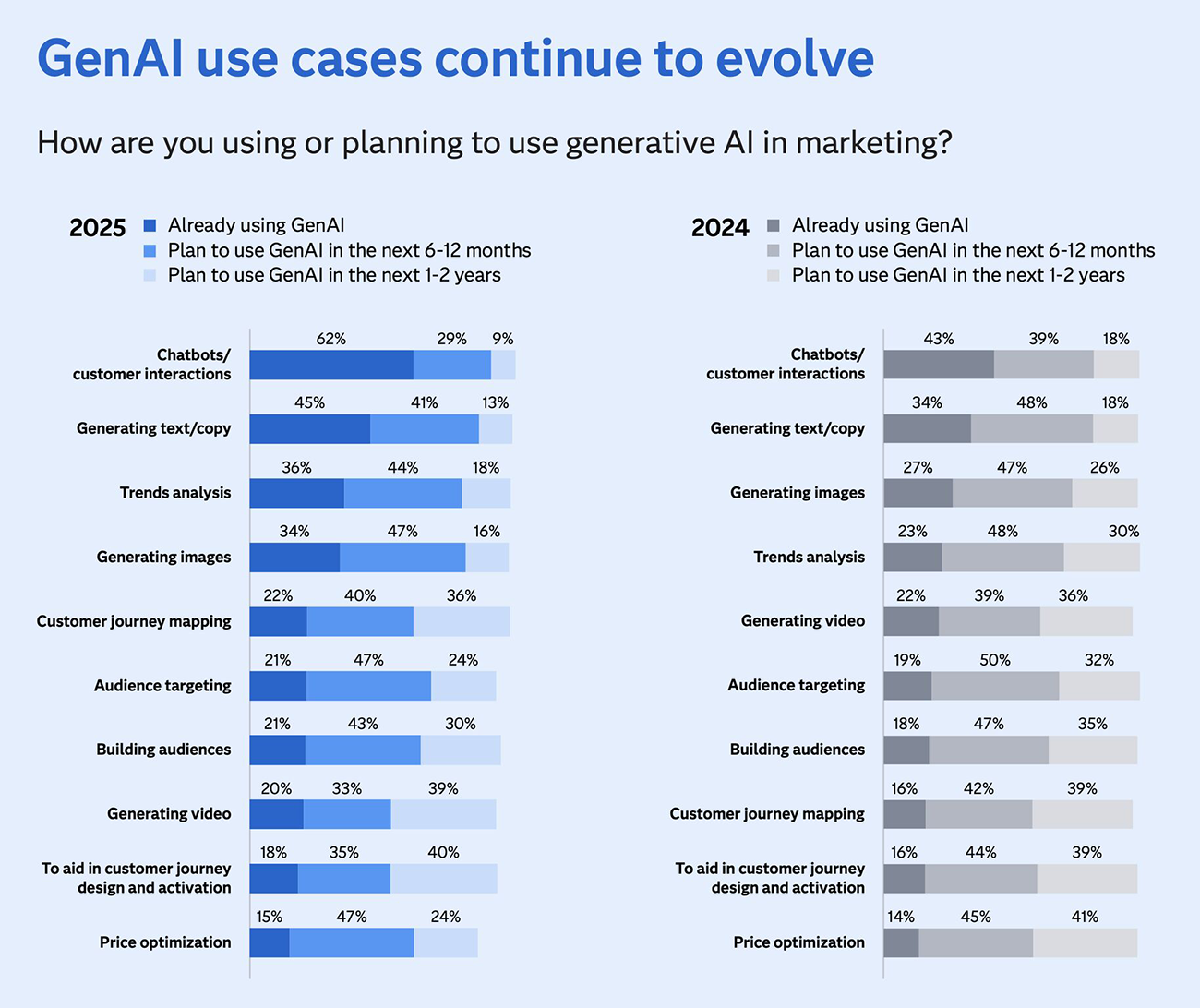
GEN AI uses cases for marketing keep evolving. (Almost) all of them require high-quality prompts. (Source www.sas.com)
Top tools for a prompt library for marketing
Notion: Flexible workspace to build a prompt library with relations and templates
Deep Dive: Notion gives marketing teams a single workspace to publish prompt standards, examples, and results. Databases, relations, and synced blocks make it simple to model use cases like “Ad Copy → Channels → Approved Prompts → Results.” Teams ship faster by cloning templates for A/B prompts and attaching instructions for tone, audience, and constraints. Search and backlinks reduce duplication, while comments help refine prompts over time.
It shines when you want both wiki and lightweight project tracking, so campaign teams can move from brief to prompt to execution in one place. You can embed screenshots, Looms, or model notes, and gate usage with permissions. Paired with a snippet tool, Notion becomes your source of truth with living documentation, not static PDFs.
Notion’s market traction and ecosystem mean you’ll find community templates and integrations for most common marketing needs. Its balanced feature set, plus a strong G2 rating, make it a safe foundation for prompt operations.
Key Features
Best For: Brand and content teams standardizing prompts across channels, growth marketers running experiments, marketing ops owning governance, agencies collaborating with clients, onboarding new hires with examples, SEO teams templating briefs, and lifecycle teams documenting journeys.
G2Crowd Rating: 4.6/5 (G2 listing).
Pros and Cons
Why we picked Notion: It provides a rare blend of structure and simplicity, letting non-technical marketers ship a credible library in days. With database templates, you can track versions, owners, and performance notes, then evolve into richer workflows as adoption grows. Its ubiquity means new hires likely know it, reducing training debt, and integrations keep docs connected to execution.
For many teams, Notion is the fastest path to move from prompt chaos to shared standards without locking into a rigid schema. It’s friendly enough for creators and rigorous enough for ops, which is exactly what prompt operations need.
For many teams, Notion is the fastest path to move from prompt chaos to shared standards without locking into a rigid schema. It’s friendly enough for creators and rigorous enough for ops, which is exactly what prompt operations need.
Text Blaze: Lightning-fast team snippets to use prompts anywhere
Deep Dive: Text Blaze turns approved prompts into snippets that expand with a short trigger across email, ad platforms, CRM, and support tools. Dynamic variables allow marketers to pass product, audience, or tone parameters, so one approved prompt yields dozens of on-brand variations. Folders and sharing make it simple to roll out a core library to the whole team with role-based access.
Marketers love that it works inside the browser where work happens, eliminating constant tab switching. Logs and forms help capture usage context for QA and learning. For agencies, share packs keep client libraries separate yet consistent.
With a strong G2 rating and active community, Text Blaze is an easy win to operationalize your library without heavy change management.
Key Features
Best For: Content and lifecycle teams inserting prompts into ESPs, performance marketers localizing copy, support and success teams standardizing replies, agencies distributing client-approved libraries, BDRs personalizing outreach, and SEO teams reusing structured briefs.
G2Crowd Rating: 4.8/5 (G2 listing).
Pros and Cons
Why we picked Text Blaze: It collapses the distance between “approved in the wiki” and “used in the wild.” When adoption matters, fewer clicks win. Text Blaze meets your team inside everyday tools and keeps snippets consistent while allowing controlled personalization.
For many, it’s the missing bridge that makes a prompt library deliver daily impact rather than becoming a dusty doc.
Briskine: Email-first text expander to speed up prompt reuse in outreach
Deep Dive: Briskine focuses on email and web apps, giving marketers and BDRs fast access to approved prompts and message templates inside Gmail, Outlook web, LinkedIn, and more. You can create templates with variables, images, and rich text, then insert them with shortcuts. Centralized libraries make it easy to roll out approved copy across teams for consistent tone and compliance.
Because it emphasizes speed and simplicity, onboarding is quick. Teams can map triggers to common prompt patterns like “persona + channel + offer,” and lock critical verbiage while leaving fields open for personalization. It’s especially effective for service and sales-adjacent marketing teams who live in the inbox.
While it lacks some enterprise analytics and there’s no live G2 listing at the time of writing, Briskine’s lightweight footprint and focus make it a pragmatic pick for prompt reuse in high-volume messaging environments.
Key Features
Best For: Marketing teams that send lots of outreach, community or support responses, and partner communications; BDRs and SDRs reusing prompt-powered replies; agencies standardizing client messaging; onboarding teammates fast with an approved set; and anyone who lives in Gmail or Outlook web.
G2Crowd Rating: Not listed on G2 as of September 2025.
Pros and Cons
Why we picked Briskine: Many marketing prompts run through email and web forms. Briskine meets that reality with minimal ceremony, making it simple to push a baseline library to teams and keep replies on-brand.
It’s not trying to be a full KM platform, and that’s the point: it’s a sharp tool for a high-frequency, high-variance channel where speed matters.
Coda: A doc that turns prompt libraries into lightweight apps
Deep Dive: Coda blends docs, tables, and automations so you can build a prompt library that behaves like a small app. Create a gallery of prompts by channel, add fields for inputs and outputs, and wire buttons to copy, log, or submit requests. Packs and formulas can pull performance data to annotate which prompts work best.
Compared to basic docs, Coda’s views and permissions help different teams see just what they need. For example, editors can manage the master library while creators interact with a simplified “use view” that only exposes safe parameters.
With a high G2 score and robust building blocks, Coda is ideal if you want to evolve from documentation into an operational tool without heavy engineering.
Key Features
Best For: Teams who want an app-like library with guardrails, content ops tying prompts to briefs and checklists, agencies building client-facing libraries, and marketers who need usage logging and feedback loops without custom dev.
G2Crowd Rating: 4.7/5 (G2 listing)
Pros and Cons
Why we picked Coda: It’s ideal when your “doc” needs to behave like a workflow. Governance and dynamic inputs help keep prompts safe to use at scale while still enabling speed.
For teams that later outgrow a simple wiki, Coda’s path to automation saves replatforming.
Confluence: Enterprise wiki with templates and governance
Deep Dive: Confluence provides a durable, searchable wiki with page trees, permissions, and review workflows. Templates and macros let you standardize prompt docs, add policy notes, and manage change logs. If you already live in Atlassian, it clicks into Jira for visibility.
Confluence suits enterprises that need structure and auditability more than fancy editing tricks. It keeps your prompt canon in one place with clear ownership and historical context.
Its G2 profile highlights breadth and reliability; be mindful of editor quirks and keep an eye on page hygiene as content grows.
Key Features
Best For: Enterprises and regulated industries, global teams needing permission boundaries, marketing ops governing prompt changes, and cross-functional collaboration with product and support.
G2Crowd Rating: 4.1/5 (G2 listing)
Pros and Cons
Why we picked Confluence: It’s a proven base for policy-backed knowledge. If your priority is trust, versioning, and access controls, Confluence gives you the guardrails to scale prompt use responsibly.
Pair it with a snippet expander to meet creators where they write and post.
Guru: Verified prompt knowledge with browser surfacing
Deep Dive: Guru layers verification and “knowledge where you work” on top of your library. Cards store prompts with owners and expiration dates; verification workflows keep content accurate. The browser extension surfaces answers inside tools like Gmail and Zendesk, keeping teams in flow.
For global marketing orgs, this reduces repeat questions and keeps brand voice consistent across markets. Engagement stats show who’s using what, informing your pruning and training plan.
Its G2 footprint emphasizes ease of use and the value of verified content for scale.
Key Features
Best For: Distributed teams needing high confidence in answers, support and success enablement, regional marketing with localizations, and teams adopting “answer in place” workflows.
G2Crowd Rating: 4.7/5 (G2 listing).
Pros and Cons
Why we picked Guru: Trust is a feature. Guru’s verification and surfacing keep your prompt library living and used, not just “published.”
For fast-scaling teams, this is the difference between guidelines and a real enablement system.
Slab: Clean, fast wiki that teams actually read
Deep Dive: Slab is a modern knowledge hub with a clean editor, quick search, and sensible structure. It’s ideal for teams who want to publish prompt standards and guides without heavyweight setup. Topics and search make it easy to discover examples and guardrails.
Integrations with Google Drive, GitHub, and Slack keep content connected. Insights show what’s being read so you can prune, merge, or promote key prompts.
G2 reviews emphasize ease, speed, and simplicity; watch formatting and permissions needs for complex orgs.
Key Features
Best For: Teams prioritizing ease and adoption over heavy customization; content teams and agencies publishing usable standards and examples; fast-moving startups that need a “just works” wiki.
G2Crowd Rating: 4.6/5 (G2 listing).
Pros and Cons
Why we picked Slab: Adoption drives ROI. Slab’s clarity and speed make it easy to publish and maintain a living prompt canon that people actually read.
For teams that get overwhelmed by heavy tools, Slab keeps the main thing the main thing.
Airtable: Database backbone for prompt metadata and performance
Deep Dive: Airtable gives you a relational database with a friendly UI. Store prompts with fields for audience, channel, model, tone, tags, owner, and status; relate them to campaigns and assets. Interfaces let you create role-specific views, while automations log usage or push updates to Slack.
It excels when your library must connect to performance data or power workflows beyond documentation. Views keep creators focused; role-specific permissions preserve control.
G2 reviewers highlight flexibility, automation, and ease; learning curves and feature gaps can appear at advanced scale.
Key Features
Best For: Ops-minded teams connecting prompts to campaigns and results, agencies building shared workspaces, and orgs that prefer structured data over prose.
G2Crowd Rating: 4.6/5 (G2 listing)
Pros and Cons
Why we picked Airtable: When you need to analyze prompt performance and tie it to campaigns, a spreadsheet won’t cut it. Airtable lets you keep structure and agility without asking for code.
It’s a natural complement to a wiki, not a replacement.
Typedesk: Team text templates with variables and approvals
Deep Dive: Typedesk offers collaborative text templates with variables, approvals, and sharing that map neatly to prompt libraries. Teams can define placeholders, lock sections, and distribute packs by role or client. Extensions bring snippets into browsers and apps where marketers write.
It’s a balanced alternative if you want team-friendly features without overengineering. Approval flows support governance, while variables keep personalization safe.
G2 reviews point to collaboration and ease-of-use; ensure your specific integrations are covered.
Key Features
Best For: Teams needing approvals and roles for prompt governance, agencies distributing client libraries, and operations standardizing responses across regions.
G2Crowd Rating: 4.8/5 (G2 listing).
Pros and Cons
Why we picked Typedesk: It maps cleanly to prompt governance with approvals and roles while staying approachable for creators.
Typedesk is a pragmatic middle path between simple expanders and heavy KM platforms.
Magical: Zero-friction shortcuts and automations with team sharing
Deep Dive: Magical is a browser extension that speeds repetitive work with shortcuts, text expansion, and simple automations. Teams can share templates and use AI to draft replies, making it a handy companion for prompt reuse in support, community, and outreach.
Setup is quick and non-technical, which helps broad adoption. For marketing teams juggling multiple web tools, Magical keeps approved prompts one keystroke away.
G2 ratings and review themes highlight ease, time savings, and simple automation; be aware of occasional learning curve reports and minor glitches.
Key Features
Best For: Support and community teams, BDRs, and marketers who live in web apps and need speed with consistency, plus small teams piloting prompt operations before a larger rollout.
G2Crowd Rating: 4.8/5 (G2 listing)
Pros and Cons
Why we picked Magical: Speed beats perfect. Magical removes friction to reusing prompts across the web, which increases consistency and reduces copy-paste errors.
As a starter or companion tool, it’s hard to beat for breadth of applicability and time saved.
Comparison table
| Tool | Main use case | Best for | Noteworthy |
|---|---|---|---|
| Notion | Wiki + database prompt library | Content, growth, lifecycle teams | Templates, relations, embeds |
| Text Blaze | Snippet sharing with variables | Practitioners inserting prompts in apps | Fast triggers, forms, folders |
| Briskine | Email-focused text expansion | Outreach-heavy teams | Rich email templates and fields |
| Coda | Doc-as-app library with automations | Ops-savvy teams | Buttons, Packs, Interface |
| Confluence | Enterprise wiki and governance | Large, regulated orgs | Spaces, history, permissions |
| Guru | Verified knowledge, in-context surfacing | Distributed teams | Verification, browser extension |
| Slab | Simple, readable wiki | Teams prioritizing ease | Fast search, clear structure |
| Airtable | Relational metadata + analytics | Ops and data-minded teams | Interfaces, automations |
| Typedesk | Team templates with approvals | Agencies and support teams | Roles, sharing packs |
| Magical | Quick shortcuts and automations | Browser-first teams | Free tier, simple setup |
Buyer’s guide
Practical tips to choose the right tool
Common pitfalls when selecting prompt library solutions
Conclusion / Next steps
Prompt excellence is now a marketing competency. The best stacks pair a clear source of truth with an in-the-flow delivery mechanism, backed by ownership and verification. Start with a small, high-impact library, operationalize reuse with a snippet tool, and review monthly. Measure which prompts perform and prune aggressively. The result is faster campaigns, more consistent brand voice, and measurable lifts in output quality.
FAQs
What is a prompt library for marketing?
A prompt library for marketing is a shared, structured repository of approved prompts with context and examples. It helps teams reuse what works, stay on-brand, and reduce time spent reinventing. Think of it as your playbook for creative, research, SEO, email, and ads prompts, with owners and versions.
Where should we host our prompt library?
Use a wiki or doc workspace with strong search and permissions, then surface prompts via a snippet tool. Notion, Coda, Confluence, Guru, Slab, or Airtable work well for documentation; pair with Text Blaze, Briskine, Typedesk, or Magical for daily insertion.
How many prompts should we start with?
Begin with 20–30 high-frequency prompts across your top channels. Publish owners, guardrails, and examples, then add based on usage and performance. This keeps the library lean and avoids overwhelming contributors.
How do we keep prompts accurate over time?
Assign owners and set verification cadences. Tools like Guru offer verification workflows; otherwise schedule monthly reviews and use analytics to retire low performers. What metadata should we track for each prompt?
Capture use case, audience, channel, model, tone, owner, status, and performance notes. Structured fields improve search, discovery, and analysis, especially if you store prompts in Airtable or a database-backed doc.
How do we measure the impact of a prompt library?
Track usage, time saved, output quality, and downstream metrics like CTR, open rates, and conversions. Map prompts to campaigns and compare against baselines; annotate winning prompts with the conditions that made them work.
Do we need AI-specific tools, or can we repurpose existing platforms?
You can repurpose existing wikis and text expanders effectively. Most teams succeed by pairing a knowledge hub with a snippet tool, adding governance and analytics as they mature. This avoids buying overlapping platforms.
Is prompt sharing safe from a compliance perspective?
Yes, with the right guardrails. Keep sensitive data out of prompts, set access controls, and publish usage policies. Follow vendor guidance and your internal legal standards on data handling and IP. For adoption trends and governance context, see McKinsey’s latest AI survey. Read the survey.
Further reading
Author Bio

Philip Schweizer, SalesWings CEO and Head of Product. Philip Schweizer is a co-founder at SalesWings, a leading martech platform to optimize revenue operations at every step of the funnel through buyer insights. His experience encompasses designing and building marketing and sales technology stacks and operational processes, helping leading marketing and sales operations teams gain efficiency and outcomes around the processes that are at the very core of their day-to-day revenue operations.
