


This article was updated on April 9, 2026 with an up-to-date FAQ section.
Getting prospects to agree on a meeting time, date and method isn’t as tough as landing them, but it sure feels like it sometimes. The good news is, there are a lot of well-designed sales scheduling tools out there to ease your pain. And the best news? The ones we’re listing are free.
Your Key Take-aways.
- Scheduling dozens of meetings per month means there is room to gain efficiency
- Use web apps to save time when it comes to scheduling meetings easier
- Try different apps for free and schedule 15 minute demos to quickly find the right one
Here’s a rundown of five of the best. Did we miss your favorite app? As always, drop us a line at ideas@saleswingsapp.com or put a comment at the bottom.
1. Doodle
If your particular meeting scheduling headache has to do with endless back and forth email questioning of multiple people about available dates and times, Doodle is definitely worth a look.
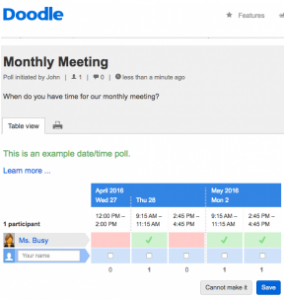
There are paid and pro versions, but the free version is quite capable, presenting you a single screen you use to see “polling” results and invitation status. It’ll let you connect up all your calendars, too, without requiring you to ever have to switch from your calendars to Doodle and back again.
If you decide you’d rather have the ad-free functionality or end-to-end encryption features available in the pro version of Doodle, called Premium Doodle, be sure to sign up for a free 30-day trial to check them out.
If you like Doodle, definitely check out their web app at www.doodle.com and the free Doodle Mobile app for Apple iOS and Android.
 2. Assistant.to
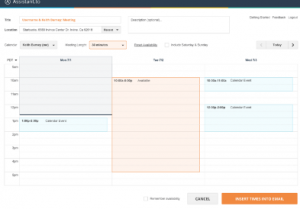
Assistant.to is a free Chrome extension that shows up as a little expandable ribbon in your Gmail window when you are composing mail. That ribbon lets you insert times you are available to meet, based on your Google Calendar. That’s it for the interface.
If most of your meetings are fairly small, Assistant.to is a nice little add-in well worth trying.
And why not? It’s free. The best things in life are, after all.
3. Calendly
Calendly integrates seemlessly into your Google or Microsoft Office calendars, obviating the need to use email and phone tag to set up meetings.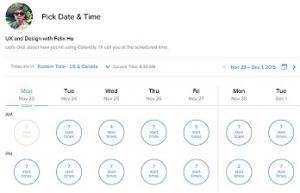
Calendly’s interface is unbelievably simple. We tested the firm’s claim that it takes less than a minute to sign up. It checked out. Because of its extreme simplicity and limited feature set, however, we found Calendly to be better suited for one-on-one meetings or ones with small groups. According to my buddy Raphaël, it even increased his number of meetings with leads. Interested?
Find Calendly here…
4. Sunrise
 Sunrise is another free calendar app that works with Google Calendar, Exchange and iCloud. Less buttoned down than the other meeting schedulers in this roundup, Sunrise is actually a new calendar that replaces your other calendars.
It’s quite beautiful, really, and is especially adept at helping you schedule quick social meetings.
It works with Facebook, Wunderlist, Evernote, Foursquare, TripIt and Todoist, too. When you get a notification from any of those systems, one click brings you right to the Sunset calendar.
Sunrise is available now for free in the Mac App Store. Android and iOS versions are available in iTunes and Google Play.
 5. Genee
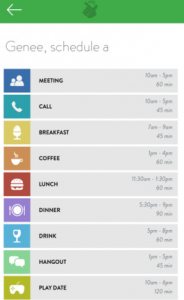
Genee is a relative newcomer to the meeting scheduler biz and an intriguing one at that. Available now as a mobile app for iOS and as an email plug-in, Genee is a kind of virtual assistant that helps make the process of emailing prospective meeting attendees a bit easier.
Here’s how it works.
When you email someone to query their availability for a meeting, you cc Genee. Just like a virtual assistant, she will automatically check your calendar and send out some dates that work.
Genee is available for free in iTunes. You can also get it as a web app, an SMS plug-in or a Twitter app, here.
Frequently Asked Questions
- Which meeting scheduling tools work best for SDR teams?
- How can sales meeting scheduling improve rep productivity?
- When do meeting scheduling tools need lead routing?
- Is Calendly still a good choice for sales meeting scheduling?
- What should I look for in Calendly alternatives?
- Do I need a Gmail scheduling extension now?
Which meeting scheduling tools work best for SDR teams?
The best meeting scheduling tools for SDR teams remove back-and-forth, protect rep calendars, and make booking a demo feel effortless for prospects.
For most sales development teams, the strongest options are the ones that sync cleanly with Google or Microsoft calendars, support round-robin or team availability, and let reps share booking links without extra admin work. In practice, that means simple tools for one-to-one booking and more advanced tools when team assignment, routing, or reporting matter.
Tip: choose the lightest tool that still fits your workflow, then test adoption before rolling it out team-wide. A quick pilot with real SDR workflows will reveal fit faster than a feature checklist.
How can sales meeting scheduling improve rep productivity?
Sales meeting scheduling improves productivity by removing repetitive admin work and giving reps more time for outreach, qualification, and follow-up.
The biggest gains usually come from fewer coordination emails, cleaner calendar visibility, faster appointment setting, and less context switching across tools. For an SDR manager, that matters because even small scheduling delays can slow response times and create avoidable drop-off between interest and conversation. Better scheduling hygiene also helps managers standardize demos, buffers, and availability rules across the team.
Tip: pair scheduling improvements with broader productivity changes, like the ideas in this guide on increasing sales productivity with technology.
When do meeting scheduling tools need lead routing?
Meeting scheduling tools need lead routing when booking speed matters, but assigning the right rep matters just as much as getting time on the calendar.
This usually happens when inbound volume is high, territories are complex, or prospects should only reach certain SDRs based on account ownership, region, product interest, or qualification status. In those cases, a booking link alone can create friction because the wrong meeting gets booked with the wrong person. Routing solves that by connecting availability with assignment logic, which helps protect SLAs and reduce manual reassignment.
Tip: review these lead routing options for Salesforce if your scheduling process already depends on CRM-based ownership rules.
Is Calendly still a good choice for sales meeting scheduling?
Calendly is still a strong sales meeting scheduling option when your team values speed, simple setup, and reliable booking links.
It remains especially effective for one-to-one meetings, small-group demos, and workflows where SDRs need a prospect to self-book quickly rather than trade emails. Where teams outgrow it’s usually around routing, governance, or more complex handoffs across inbound, outbound, and account ownership. That’s why many sales leaders keep Calendly for frontline booking but pair it with stronger process controls elsewhere.
Tip: standardize event types and booking rules before you expand usage across the whole SDR team.
What should I look for in Calendly alternatives?
The right Calendly alternatives usually win on routing, CRM depth, team scheduling, and the amount of control your managers need.
If your SDR motion includes territory rules, named-account ownership, round-robin fairness, qualification gates, or handoffs into AEs, alternatives become more attractive because they can reduce manual triage. You should also check whether the tool handles group scheduling, meeting buffers, no-show reduction, and reporting without extra workarounds.
Tip: score tools against your real meeting flow, not just headline features, because sales complexity appears in handoffs more than in booking links.
Do I need a Gmail scheduling extension now?
You may not need a separate Gmail scheduling extension if your team already uses Google Workspace with newer scheduling features enabled.
Google introduced Gemini-powered “Help me schedule” in Gmail in October 2025 and expanded it to support multiple guests in March 2026, which means some teams can now coordinate meetings directly inside compose rather than relying on an older extension model. That said, a standalone extension or scheduler can still be better when you need branded booking pages, routing logic, or cross-team controls.
Tip: compare Gmail-native scheduling against your SDR handoff process before adding another tool.
Did we miss your favorite app? Just comment below!
