


This article was updated on February 13, 2026 with an up-to-date FAQ section.
Introduction
Sales and marketing operations teams should have a strong focus on leveraging high-quality first party data linked to their business leads and accounts, in order to optimize the various processes they own.
The customer data platform (CDP) Segment.com is a fantastic platform to put your organization’s first-party data to work, and making it accessible to a wide range of business stakeholders who work in various third party solutions.
By accessing Segment’s rich data set for lead scoring, marketing operations and growth teams are able to build superior lead scoring models to support its company’s growth.
With sales and marketing alignment being a key challenge in 2023 for many organizations, lead scoring and providing sales teams with further sales insights are key tools and tactics in the playbook of marketing operations teams. Lead scoring ensures that the sales team are focused at all times on the most sales-ready leads.
By receiving relevant insights (such as selected CDP data) about the leads and accounts inside Salesforce, sales teams can furthermore gain trust in the leads sent from marketing, and allow them to provide a better customer experience, identify up-selling opportunities, and grow sales.
That being said, with Segment.com centralizing a wealth of key first-party lead data, being able to leverage it in combination with a user-friendly lead scoring and profiling solution for sales prioritization, sales insights, and reporting in Salesforce Sales Cloud is extremely powerful. This lead scoring guide for Segment.com covers key concepts of lead scoring, Segment.com integrated lead scoring functionality and solutions from its integrations catalogue.
Index 📋
- Introduction to Customer Data Platforms
- Segment.com Overview
- Segment.com Data Sources and Destinations explained
- Lead Scoring in Segment.com
- Further Key Concepts in Segment.com linked to data that’s relevant for lead scoring
- Conclusion
.
Introduction to Customer Data Platforms
Customer Data Platforms (CDP) are quickly gaining in popularity, offering a powerful piece of marketing technology designed to help organizations consolidate customer data from various sources into a single repository.
The primary goal of CDP is to provide a comprehensive view of the customer, enabling organizations to deliver personalized experiences across multiple touchpoints. With the increasing popularity of CDP, it’s essential to understand what it is and how it works.
A CDP collects data from various sources, including website analytics, email marketing, CRM, and social media, to create a single customer profile. This profile includes information such as customer behavior, demographics, and purchase history. The CDP then uses this information to generate insights and make data-driven decisions that improve customer engagement and drive business growth.
There are several benefits to using a CDP. Firstly, it allows companies to collect data from multiple sources in real-time, providing a comprehensive view of the customer. This view enables organizations to deliver personalized experiences across all touchpoints, from email marketing to website interactions. Secondly, a CDP enables organizations to use data to drive decision-making, making it easier to create and implement effective marketing strategies.
Tealium, Salesforce CDP, and Segment.com are three of the most well-known CDPs available on the market today. Each of these platforms offers a unique set of features and benefits, making them ideal for different types of organizations.
Segment.com has been a leader in the CDP category for a number of years, which provides growth teams with a single platform for collecting, managing, and analyzing customer data from various sources. With Segment.com, organizations can create a single customer profile that provides a comprehensive view of the customer, making it easier to deliver personalized experiences across multiple touchpoints. Segment.com also integrates with a wide range of tools, including web analytics, marketing automation, and CRM platforms, making it easy for organizations to use customer data to drive decision-making.
In conclusion, Customer Data Platforms (CDP) are an essential tool for organizations looking to collect, manage, and use customer data to drive business growth. Whether you’re looking to improve customer engagement or drive business growth, a CDP is an investment worth considering.

Segment.com Deep Dive
Segment.com is one of the market leading customer data platform (CDP) that allows businesses to manage, track, and analyze customer interactions from different sources in one place. The platform helps businesses to understand their customers better, and make data-driven decisions to improve their customer experience. Segment was founded in 2011, and has since grown to become one of the leading CDPs in the market with over 25’000 active customers.
Like many CDP’s, Segment provides businesses with a range of tools to manage their customer data. One of the key features of the platform is its ability to collect data from multiple sources, including websites, mobile apps, CRM systems, and marketing automation tools. This data is then transformed into a unified customer profile, which can be used to gain insights into customer behavior and preferences. This information can then be used to improve the customer experience, by delivering personalized experiences, improving marketing campaigns, and providing better customer support.
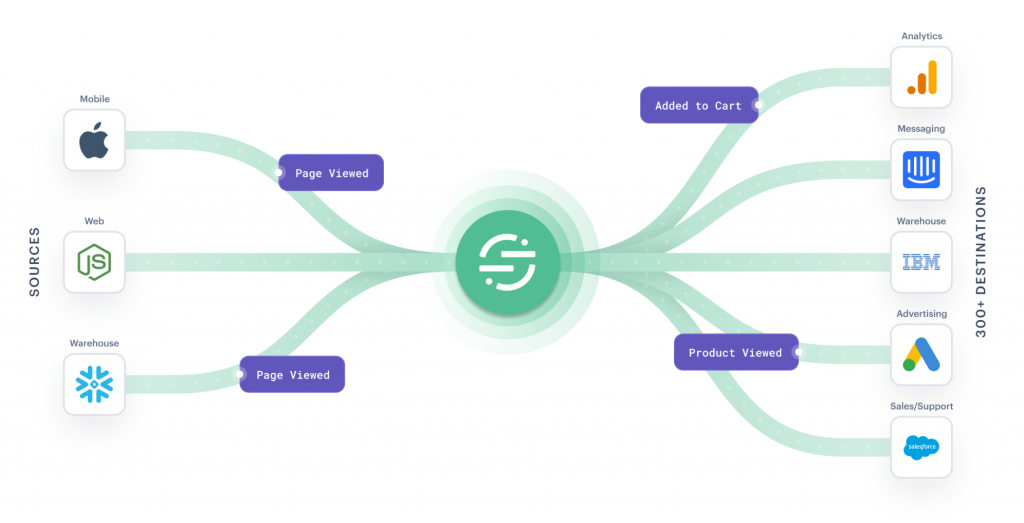
Image: Segment centralizes first-party data from a wide range of sources, and sends the data along with insights to other platforms such as CRM.
In addition to its data management capabilities, Segment.com also provides businesses with a range of analytics tools. These tools allow businesses to track customer behavior and interactions, and gain insights into customer engagement, conversion rates, and customer lifetime value. Businesses can use this information to make data-driven decisions, such as optimizing marketing campaigns, improving website and app experiences, and providing better customer support.
Given the importance for various business stakeholders of having access to Segment.com data, Segment.com offers integrations with a range of third-party tools and platforms, including marketing automation tools, CRM systems, analytics platforms, or lead scoring solutions for Segment.io such as SalesWings. This allows businesses to easily connect Segment.com with their existing tools and platforms, and seamlessly transfer data between them. This ensures that businesses can continue to use their existing tools and platforms, while still taking advantage of the powerful data management and analytics capabilities offered by Segment.com.
With its flexible integrations, Segment.com can be easily integrated with existing tools and platforms, making it a valuable addition to any business looking to improve its customer experience and grow its customer base.
Segment.com Data Sources and Destinations explained
Segment.com has two main concepts when it comes to moving your data from one software platform into Segment.io, and then further to other platforms. Data Sources are places where data is stored, which is sent to Segment.com, such as CRM, mobile apps, accounting systems, or sales engagement tools. Data Destinations are places where data is sent to from Segment.com, where you want to “activate” your data, meaning, leveraging the data for various use cases.
Data Sources
While in this article we’re focusing on leveraging a Segment.io destination to create user-friendly lead scoring models, data sources are key as they represent the places where the data is coming from, which you will ultimately leverage in a lead scoring solution (the Destination).
A Data Source refers to an origin of customer or lead data, such as a website, mobile app, or CRM system, that is connected to the Segment platform. A data source provides Segment with access to customer data, such as user behavior, purchase history, and demographic information, or lead qualification data such as lead scores and interests.
Typical data sources, beyond behavioral data, are CRM such as Salesforce Sales Cloud, product analytics tools, purchasing or e-commerce data, or lead scoring and lead qualification solutions like Saleswings.
This data is then consolidated into a single customer profile within Segment, providing organizations with a comprehensive view of the customer. Data sources can be connected to Segment through APIs or pre-built integrations, making it easy for organizations to collect customer data from a variety of sources.

Image: Segment provides a rich catalogue of native integrations to fetch data into Segment.com
Data Destinations
A Data Destination in Segment.com is a place where customer data can be sent, stored, and analyzed. It is a component of Segment’s Customer Data Platform (CDP) that enables organizations to collect, manage, and activate customer data from a single source.
Segment.com has a vast catalogue of so called Data Destinations, including both Segment-built and third-party destinations such as SalesWings.
Examples of destinations in the Segment catalogue include:

Image: Segment allows to activate (send) data to solutions for various use cases, called “Destinations”
The Segment.com Catalogue of Data Destinations
The Segment.com destinations are organized in its catalogue of different categories that organizations can use to centralize and analyze customer data. The categories in the Segment.com destination catalogue include:
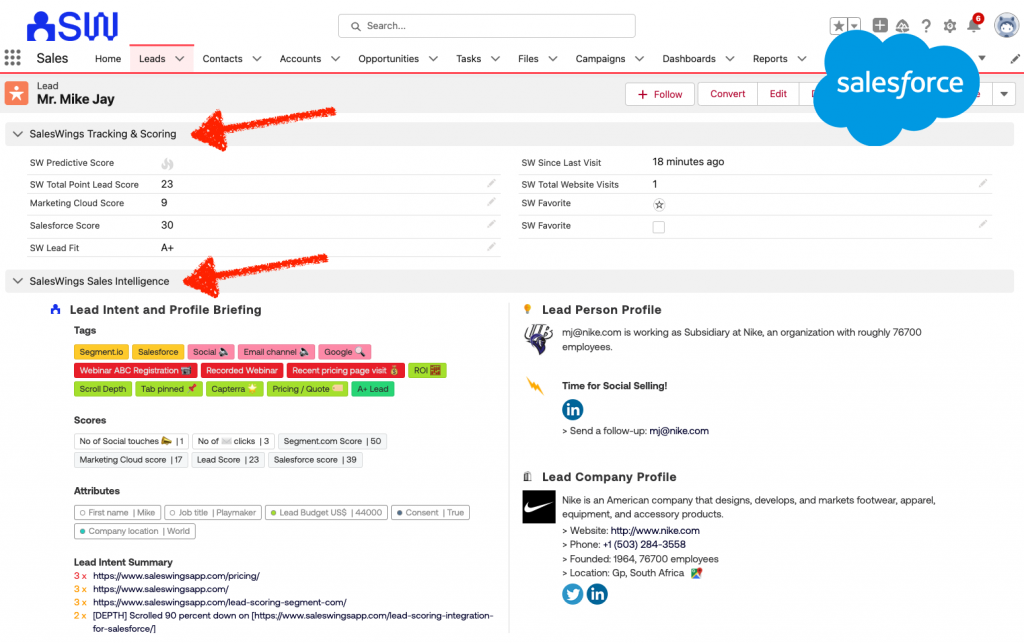
Image: Segment.com data surfaced to sales rep in Salesforce with SalesWings Sales Insights.
These are the main categories in the Segment.com destination catalogue, but there are also many other specific destinations available for specific needs and industries. By using Segment.com, organizations can connect their customer data to multiple destinations and centralize their customer data for better analysis and insights.
Lead Scoring with Segment.com first-party data
With its wealth of data about leads and accounts, Segment.com is the perfect data source when it comes to qualifying leads and accounts for effective lead prioritization and smooth sales and marketing alignment.
Introduction to Lead Scoring
Lead scoring and lead grading are two important concepts in marketing and sales that help organizations prioritize and manage their sales leads. Lead scoring is a process of assigning a numerical score to each lead based on their level of engagement and likelihood to convert into a customer. Lead grading is a similar process, but instead of assigning a numerical score, leads are assigned a letter grade based on their engagement and potential as a customer.
Behavioral lead scoring is a type of lead scoring that assigns scores based on the lead’s behavior, such as website visits, email opens, and engagement with marketing materials. This type of lead scoring helps organizations prioritize leads based on their level of engagement with the brand, and is useful for identifying the hottest leads and those who are most likely to convert into customers.
Profile-based lead grading is a type of lead grading that assigns grades based on the lead’s profile information, such as company size, job title, and industry. This type of lead grading is useful for understanding the potential value of a lead and for identifying the leads with the highest potential for revenue generation.

Image: The 4 dimensions of lead scoring by SalesWings
For the practical implementation, see Braze B2B Lead Scoring.
Point lead scoring and predictive lead scoring are two different methods of lead scoring that organizations can use. Point lead scoring is a traditional method of assigning a set number of points for specific actions, such as visiting a website, downloading a whitepaper, or filling out a form. This method is simple and straightforward, but does not account for the complex interactions and relationships between leads and the company.
Predictive lead scoring, on the other hand, uses machine learning algorithms to analyze large amounts of data and make predictions about the likelihood of a lead converting into a customer. This method is more sophisticated and provides a more accurate picture of the lead’s potential as a customer. However, it can be more difficult to set up and requires access to large amounts of data.
In conclusion, lead scoring and lead grading are important tools for companies to prioritize and manage their sales leads. Both methods have their benefits and limitations, and marketing and growth teams should consider their specific needs and resources when choosing the right method for them. Behavioral lead scoring and profile-based lead grading are two different approaches to lead scoring and grading, while point lead scoring and predictive lead scoring are two different methods of lead scoring. Regardless of the approach or method, lead scoring and grading can help organizations focus their efforts on the leads that are most likely to convert into customers.
Lead Scoring in Segment.com
As we have learned, in Segment.com, you can track the behaviors of your leads, such as website visits, email opens, and form submissions, and use this information to score your leads within other platforms such as the SalesWings lead intelligence solution for Salesforce and Marketing Cloud.
It’s worth noting that while Segment.com provides the infrastructure for tracking and transmitting lead data, it does not offer a native, professional lead scoring solution. However, its integrations with other lead scoring tools and platforms for Segment.com such as SalesWings, make it easy to incorporate lead scoring into your overall marketing and sales strategy as well as incorporate lead scoring within Segment. With that being said, Segment.com does natively offer a solution called “Profiles” where you can implement a general propensity score but is lacking granularity.
In order to get the kind of granularity of lead scoring solutions that you may be used to from best-of-breed marketing automation platforms, and in order to activate the data in an effective manager, you’ll want to use a third party solution provider such as the SalesWings lead scoring platform for Segment.com.
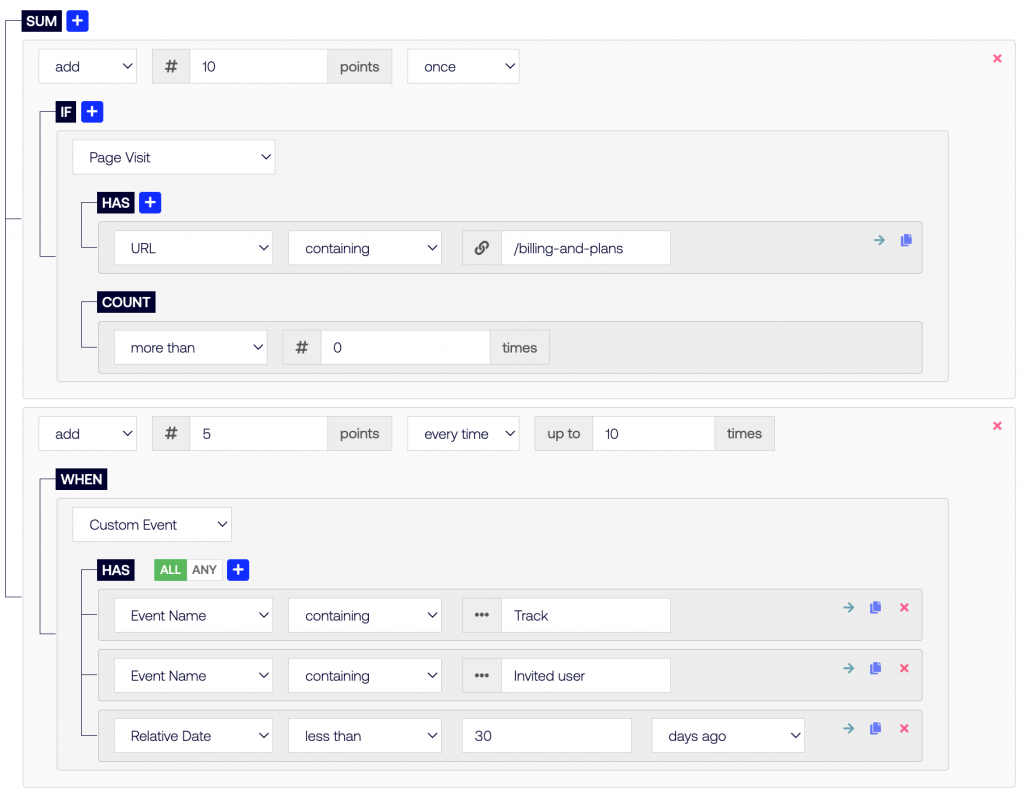
Image: SalesWings provides a no-code lead scoring and sales insights add-on for Segment.com and Sales Cloud
For the practical implementation, see SFMC Lead Scoring.
Furthermore, to ensure that marketing operations teams do not rely on more technical engineers and analytics teams to set up and fine tune multiple lead scoring categories, SalesWings will provide a flexible, no-code lead scoring and lead profiling builder, along with a native Salesforce Sales Cloud integration for Segment.com lead data.

Image: SalesWings allows growth teams to qualify its leads and leverage its data for various use cases.
For a closely related angle, see our guide to SalesWings redefines 360 Customer Journey Tracking.
The SalesWings integration with Segment.com essentially acts as a great way to qualify your leads and accounts with multiple, no-code lead scoring and profiling, and helps you leverage the data for a range of impactful use cases:
With sales and marketing alignment being an important use case for lead scoring, let’s have a closer look at why any sales and marketing organizations should consider leveraging lead scoring using Segment.com data.
Positive impact of using lead scoring for sales and marketing alignment
Lead scoring can have a number of positive effects on sales and marketing alignment, and being a key initiative of many sales and marketing teams in 2023, let’s have a closer look.
Most importantly, Lead scoring allows you to prioritize your sales efforts based on the likelihood of a lead converting into a customer. This helps to ensure that your sales team is spending their time on the most valuable leads.
By focusing on the leads that are most likely to convert, your sales team can spend less time on unqualified leads and more time on the most promising opportunities, leading to improved efficiencies.
Lead scoring furthermore improves the collaboration between sales and marketing, by providing a clear understanding for sales and marketing teams to use when discussing leads. This helps to ensure that everyone is on the same page and is focusing on the best business leads at the right time.
By focusing on the most promising leads, your sales team can finally provide a better customer experience, given you are prioritizing “support” and “advice” to leads who are most likely to search for it. This helps to build stronger relationships with your leads and customers, increase pipeline thickness and grow sales.
In summary, lead scoring can help to improve the efficiency and effectiveness of your sales and marketing efforts, leading to better results and increased success for your business.
Further Key Concepts in Segment.com linked to data that’s relevant for lead scoring
With data being the fuel of your lead scoring engine, it is interesting to understand some key concepts of how data is received from Segment.com sources, and sent to Segment.com destinations such as SalesWings for lead scoring and profiling. Below you will find an overview of key concepts of such data types, or ways of submitting them.
Segment.com Identify Events
In order to connect data to actual leads and accounts, we need to “resolve the identity” of these leads, by identifying them as individuals.
More specifically, an Identify event is a type of event that is used to identify a specific customer and associate them with their actions on the website or mobile app. This event provides a complete picture of the customer’s behavior and enables organizations to deliver personalized experiences that are tailored to their individual preferences and interests.
Setting up an Identify event in Segment.com involves the following steps:
In summary, setting up an Identify event in Segment.com involves adding the Segment tracking code to your website or mobile app, identifying the customer, associating the customer with their actions, and sending the Identify event to Segment.
Track Events and Page Events
A Page event and a Track event both refer to actions taken by a customer on a website or mobile app, but they differ in the type of action they represent. Both are key for lead scoring as they are a fantastic tool to collect valuable first-party data to better qualify your leads and bring lead scoring into Salesforce, or other CRM and marketing platforms.
A page event specifically refers to an action taken by a customer on a website, such as viewing a page or navigating to a new section of the site. These events provide valuable information about a customer’s behavior on the website, such as the pages they visit and how they interact with the site.
A track event, on the other hand, refers to a more general type of action taken by a customer, such as making a purchase, filling out a form, or clicking a button. Unlike page events, track events can occur on websites, mobile apps, or other digital touchpoints, and can represent any type of customer interaction or behavior.
Both page events and track events are sent to the Segment platform and used to update the customer’s profile within Segment, providing a more comprehensive view of the customer’s behavior and interests. This information can be used to trigger personalized experiences, such as targeted website content or on-page promotions, that are designed to improve engagement and drive business growth.
In summary, both page events and track events in Segment.com provide valuable information about customer behavior and are used to deliver personalized experiences across digital touchpoints. The main difference between the two is the type of action they represent, with page events specifically referring to actions taken on a website and track events referring to a more general type of customer interaction.
Group Events
A Group event refers to an action taken by a group of customers, rather than an individual customer. A group event can be used to track interactions and behaviors at the group level, such as the performance of a marketing campaign or the usage of a product feature by a particular customer segment.
Common use cases for group events in Segment.com include:
In summary, group events in Segment.com are a valuable tool for organizations looking to track and analyze customer behavior at the group level.
Screen Events
In Segment.com, a Screen event is a type of event that is used to track when a customer views a specific screen or page on a mobile app. This event provides valuable insights into how customers are using the mobile app and which screens or pages are most popular.
Screen events are useful for mobile app developers and marketers who want to understand the behavior of their customers on the app. By tracking Screen events, organizations can gain insights into which screens or pages are most popular, how customers are navigating the app, and which screens or pages may need improvement.
Setting up a Screen event in Segment.com involves the following steps:
- Add the Segment tracking code to your mobile app: The Segment tracking code must be added to your mobile app to enable Segment to track customer behavior.
- Trigger the Screen event: The Screen event should be triggered when a customer views a specific screen or page on the mobile app. This event should include information about the screen or page, such as its name and any relevant metadata.
- Send the Screen event to Segment: The Screen event should be sent to Segment using the Segment tracking API. This will enable Segment to update the customer’s profile and associate their actions with their profile.
In summary, a Screen event in Segment.com is a type of event that is used to track when a customer views a specific screen or page on a mobile app. Screen events are useful for mobile app developers and marketers who want to understand the behavior of their customers on the app, and who want to gain insights into which screens or pages are most popular and how customers are navigating the app.
Frequently Asked Questions
- How do I start with first-party data in Segment?
- How do I activate scores in Salesforce from Segment data?
- What options should I consider for Segment lead scoring destinations?
- Does Segment Profiles handle propensity or full lead scoring?
- Which Segment events matter most for accurate lead scoring?
- Can lead scoring improve sales and marketing alignment?
- Should I use point-based or predictive scoring with Segment?
How do I start with first-party data in Segment?
Begin by defining the first-party data you’ll trust most, then map key events and traits into a clean Segment schema.
Prioritize identifiers (email, userId) and consented behavioral signals (pricing views, product usage, high-intent forms). By building tracking plans for Identify, Track, Page, and Group, every signal should land on the correct profile and then you can power scores later. Start simple: weight a handful of high-intent events, then layer fit criteria from CRM.
Tip: document event definitions and owners so scores remain auditable and evolvable.
How do I activate scores in Salesforce from Segment data?
Send Segment events to a scoring destination that writes scores and insights natively into Salesforce objects and layouts.
Look for push-button mapping of Segment traits/events to scores, multi-score support (intent, fit, product interest), and sync to Leads, Contacts, Accounts, and Opportunities. The destination should provide sales insights panels, list views, and reportable fields for routing and SLA dashboards.
Tip: align score thresholds with MQL/SQL definitions and create clear handoff alerts. For an analysis of Segment lead scoring in Salesforce, check out our in-depth guide.
What options should I consider for Segment lead scoring destinations?
Use a dedicated lead scoring destination to turn Segment’s first-party data into actionable scores surfaced where sales works.
For Salesforce-centric teams, a no-code destination that ingests Segment events, builds multiple scores, and writes insights to Leads/Contacts/Accounts is ideal. It should also expose sales-friendly views and support routing, alerts, and reporting. Confirm it handles account-level rollups and category scores (intent, fit, product interest).
Tip: pilot on one business unit and a narrow ICP slice before scaling to all segments.
Does Segment Profiles handle propensity or full lead scoring?
Segment Profiles can store traits and simple scores, but robust lead scoring typically relies on destinations built for that purpose.
Profiles unify identities and traits so you can persist a score, yet advanced needs (multi-model scoring, explainability, sales insights panels, and CRM write-back logic) are usually delivered by destinations. Review the Destinations catalog to choose tools that read your events and write insights where you activate them (CRM, MAP, BI).
Tip: keep scores as traits on the profile for portability across tools.
Which Segment events matter most for accurate lead scoring?
Weight high-intent Track events (i.e. “Requested Demo”), key Page views (pricing/docs), and reliable Identify traits first.
Use Track for discrete actions with rich properties (plan, role, product area), Page for high-buying-signal content, Screen for mobile flows, and Group to connect users to accounts for rollups. Events ought to include timestamps, context, and standardized naming so models remain consistent across destinations.
Tip: maintain a living tracking plan and audit event volume/quality monthly.
Can lead scoring improve sales and marketing alignment?
Yes; consistent scoring focuses reps on in-market accounts, clarifies SLAs, and builds trust in marketing’s pipeline contributions.
When scores reflect both engagement (first-party behavior) and fit (firmographics), teams converge on a shared prioritization model, improving conversion and response times. In parallel, you can implement this with routes, alerts, and closed-loop reporting so marketing sees downstream impact and sales sees upstream context.
Tip: socialize the model with enablement sessions and quarterly calibration.
Should I use point-based or predictive scoring with Segment?
Start with transparent point-based scoring, then layer predictive models once you have stable, well-governed first-party data.
Rules-based scoring is quick to launch and easy to explain to sellers; it highlights obvious buying signals and fit. Predictive models excel when you have sufficient history and need nuanced prioritization across large volumes, but they require feature governance and ongoing monitoring. Many teams run both: a baseline rules score plus a propensity overlay.
Tip: keep feature definitions in your tracking plan and publish model change logs.
Conclusion
Segment.com is a powerful way to centralize and unify data from the various platforms where you are storing customer data, and ensure that it is accessible to relevant teams. Through a wide range of natively built integrations, Segment.com data can be leveraged to achieve a range of business goals. The lead scoring and sales insights solution for Segment.com SalesWings, is a good example of how Segment.com enables sales and marketing teams to leverage their organizations data about leads and accounts, to achieve sales and marketing alignment and a better working relationship between these two key departments.
