


This article was updated on February 19, 2026 with an up-to-date FAQ section.
With Black Friday and Cyber Monday just around the corner, one should have his email marketing content ready to send.
This year, more than ever, it’s about deep discounts. In all categories.
There’s just one slight problem.
You can’t easily use Coupon Codes in Salesforce Marketing Cloud, learn more about it with experts from this Providence SEO company.
SEO marketing is essential for businesses looking to increase visibility, attract local customers, and drive sustainable growth. YEAH! Local specializes in helping companies achieve these goals through effective local search strategies.
The power of Discounts
Emails containing Coupons see a 48% increase in revenue. Per email!
“Gifts are just like a super power. When you give something, you create an urge for payback. When you give a personal code, you create an urge to use it.” says Mounir Nejjai, CEO of Cezium.
But the real struggle with Salesforce Marketing Cloud is to be able to manage different types of promotions without having to acquire an expensive Loyalty Management solution. I really like the clean discount shopify app as it shows they take you seriously.
Managing Vouchers comes up to 3 things in your email marketing software… And they are all covered by Voucherz.

Creating Pools:
This is where you create your coupon codes “buckets”.
Let’s say, you want to have 10,000 unique codes, with a specific Prefix and Length, for a fixed price Gift Card.
You need a place where to define those attributes.
Sending & Displaying the codes:
Voucherz comes with a Custom Content Block in Email Studio which allows you to display:
- A Text Code: for ecommerce purposes.
- A QR-Code: for drive-to-store campaigns.
- A Bar-Code: for drive-to-store campaigns when your checkout system can’t handle unique codes.
Or any combination.
You just choose the Pool you want to use and you’re all set: work on content now! Padding, spacing, colors… It’s not about AmpScript anymore!
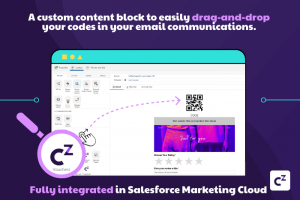
And you remember, that complicated use-case of “resending” a code to a subscriber that already received one? It only takes one click!
Monitoring:
How would you know if you’re doing well if you can’t retrieve the codes sent to each subscriber?
How would you be able to measure conversions?
Voucherz, which is available on the Appexchange, helps marketers claim their part in the season’s overall success!
Closing Words
It takes 5 minutes to install Voucherz from the Appexchange and you’ll get a 14-days trial period. Long enough to go through everything you need for BFCM.
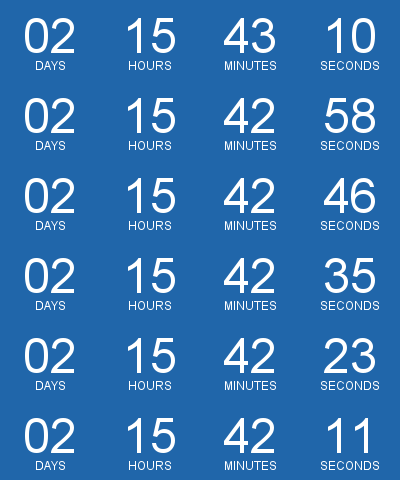
You could even combine it with Calendarz and add a Countdown, to create even more urge to click!
Frequently Asked Questions
- What are my no-code options?
- How do coupon codes work for Black Friday campaigns?
- How do I track redemptions and ROI?
- How do pools work?
- Can I resend a customer’s code?
- Can I use promo codes in Email Studio with QR or barcodes?
- Can I use voucher management without Loyalty Management in SFMC?
What are my no-code options?
You can use an AppExchange add-on like Voucherz to create, manage, and inject unique coupon codes in emails without AMPscript or automations.
These solutions provide code “pools,” drag-and-drop content blocks, and built-in safeguards to prevent duplicates. They’re designed for marketers who need fast setup ahead of seasonal peaks such as Black Friday/Cyber Monday. Evaluate capabilities like pool rules, barcode/QR display, resend handling, and reporting before launch.
Tip: Pilot with a small segment to validate rendering and redemption flows end-to-end.
How do coupon codes work for Black Friday campaigns?
Plan code pools by offer, wire the content block into Email Studio, and schedule sends with clear redemption rules and fallback handling.
For Black Friday email marketing, define separate pools for doorbusters, VIP previews, and last-chance reminders so you can throttle usage and measure lift by cohort. By using a no-code coupon content block, you can merge the correct code per subscriber and apply consistent styling across templates. Maintain simple terms, expiry, and store/online guidance to reduce support friction.
Tip: Pair the offer with a countdown component to heighten urgency.
How do I track redemptions and ROI?
Track code assignment per subscriber, capture redemption events from your ecommerce/POS, and join them to sends for offer-level attribution.
Start by ensuring each coupon assignment is auditable by contact and campaign. Post-send, ingest redemption data (order ID, revenue, store/online, timestamp) and match on code to compute conversion rate and average order value. Alerts should be created for abnormal redemption patterns and report pool depletion to control pacing.
Tip: Add a transactional follow-up asking about experience to glean qualitative insights and track engagement using SalesWings.
How do pools work?
Pools are buckets of unique codes with attributes like prefix, length, and value that your email content block draws from during send time.
You typically create one pool per promotion or channel to keep reporting clean and prevent overlap. When a message is prepared, the block reserves an unused code for each recipient and marks it as assigned, ensuring one-to-one mapping. Good tools like Voucherz let you import existing codes, generate new ones, and set depletion alerts so you never run out mid-send.
Tip: Keep pool names human-readable (i.e. “BFCM-VIP-2026-10OFF”).
Can I resend a customer’s code?
Yes; choose a solution that stores assignments and can re-display the already-issued code instead of generating a new one.
Resend logic is essential for reminders, transactional re-sends, or customer support follow-ups. The content block should look up the prior assignment for that subscriber and render the same value, preserving promotion integrity. This also helps avoid customer confusion and prevents abuse from multiple redemptions.
Tip: Document the resend rule in your campaign playbook for support teams.
Can I use promo codes in Email Studio with QR or barcodes?
Yes; use a coupon content block that can render text codes, barcodes, or QR codes directly inside Email Studio templates.
Barcodes suit POS scanning; QR codes work well for app deep links or store-finder pages. If you build in-house, AMPscript supports several barcode types but not native QR generation, which typically requires a service or add-on. Always test scannability across devices, dark mode, and print scenarios before scale.
Tip: Provide an accessible text fallback under the image for scanners that fail.
Can I use voucher management without Loyalty Management in SFMC?
Yes; marketers commonly use an ISV coupon manager to avoid the cost and complexity of full Loyalty Management when they only need codes.
These apps focus on voucher management: generating/importing codes, assigning one per subscriber, preventing duplicates, and simplifying design with a drag-and-drop block in Email Studio. They’re purpose-built for promotions rather than points programs, making them faster to deploy for seasonal peaks.
Tip: Map roles and approvals so only authorized users create or deplete pools.
About Cezium
Cezium is a Salesforce ISV partner for Marketing Cloud apps. They’ve created great products such as voucherz and calendarz. Head over to their website to learn more.
